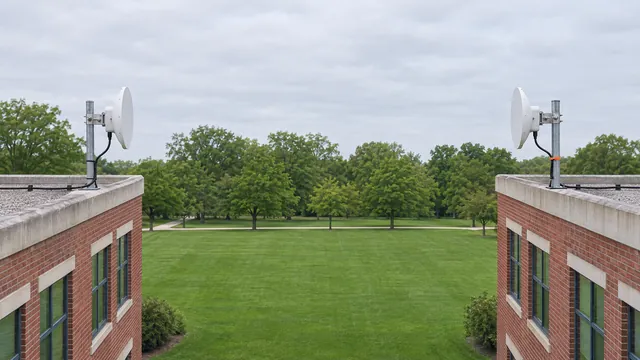
I saw the original headline promise of "without getting caught" and I winced a little, so let me deal with that up front. It reads like a caper film, right? Cable spools in a rucksack, a hurried rooftop climb, maybe a getaway bike waiting below. I'm Jill, radio waves have paid my bills for years, and I'd like to kill that fantasy right now. What you genuinely want is "without getting in trouble," a far less cinematic skill and an enormously more useful one. A signed form and a friendly email will carry you further than any midnight stealth operation ever dreamed of.
The rule that outranks every other rule
Campus regulations trump cleverness, every time, so secure sign-off before a single bracket or power cable gets touched. I don't care how beautifully your antenna is aligned if facilities discovers an unexplained dish on their roof and hauls it down. Ask first. Grovel a bit if that helps.
Why a point-to-point link earns its keep
Say your research lab needs to share a pricey spectrometer with a building across the quad. Or a weekend event needs coverage that the campus network simply can't stretch to without divine intervention. A dedicated link hands you control over bandwidth and slashes latency in ways a tower of consumer mesh routers never manages, since you're fighting zero students' phones for airtime.
Winning over the adults
Students skip this step and regret it later. Talk to campus IT first, always. They own the network you're about to extend, and they will discover your little project eventually (they always do). Facilities controls roof access, so bring them in before you even glance at a ladder. Public safety has opinions about anything bolted to a building, and if your school employs someone for spectrum or RF compliance, that person belongs at the table as well.
Write everything down: why the link exists, both endpoints, a rough sketch of mounting spots, your equipment list, and the power you'll draw. Pitch the upsides honestly, better throughput, less congestion, a maintenance plan you'll genuinely follow, and offer IT co-management of the whole thing. Nobody warms to a mystery radio on their roof. Raise transmit power and licensed bands early on, since an angry interference call three weeks in has killed more projects than I can count. My personal trick: a single-page request. Technical enough that IT nods along, warm enough that facilities stays awake past paragraph two.
Walking the actual path
Before anyone unboxes hardware, walk the route and eyeball it. Does one rooftop actually see the other? Trees, chimneys, that new engineering building nobody mentioned in the planning meeting, all of these wreck a link faster than any storm. You'll also want to respect the Fresnel zone, the invisible football-shaped bubble surrounding your line of sight that demands breathing room even when the visual path seems open.
For expectations grounded in reality: directional outdoor bridges cover a few hundred meters up to a couple of kilometers quite happily, given clean sightlines and sensible gear. Skip the gigabit promises across campus and pledge something steady and honest instead. Survey which access points and repeaters already hum nearby, then choose your band to match. 5 GHz behaves better outdoors than the crowded 2.4 GHz, and hardware supporting 5.8 or the newer 6 GHz space gives you even cleaner air, fewer squatters up there. A quick scan with campus IT's tools, or frankly a decent phone app, reveals who else is shouting on your intended channel. Watch the weather forecast too. Rain fade is real and startlingly irritating.
Choosing gear you won't regret
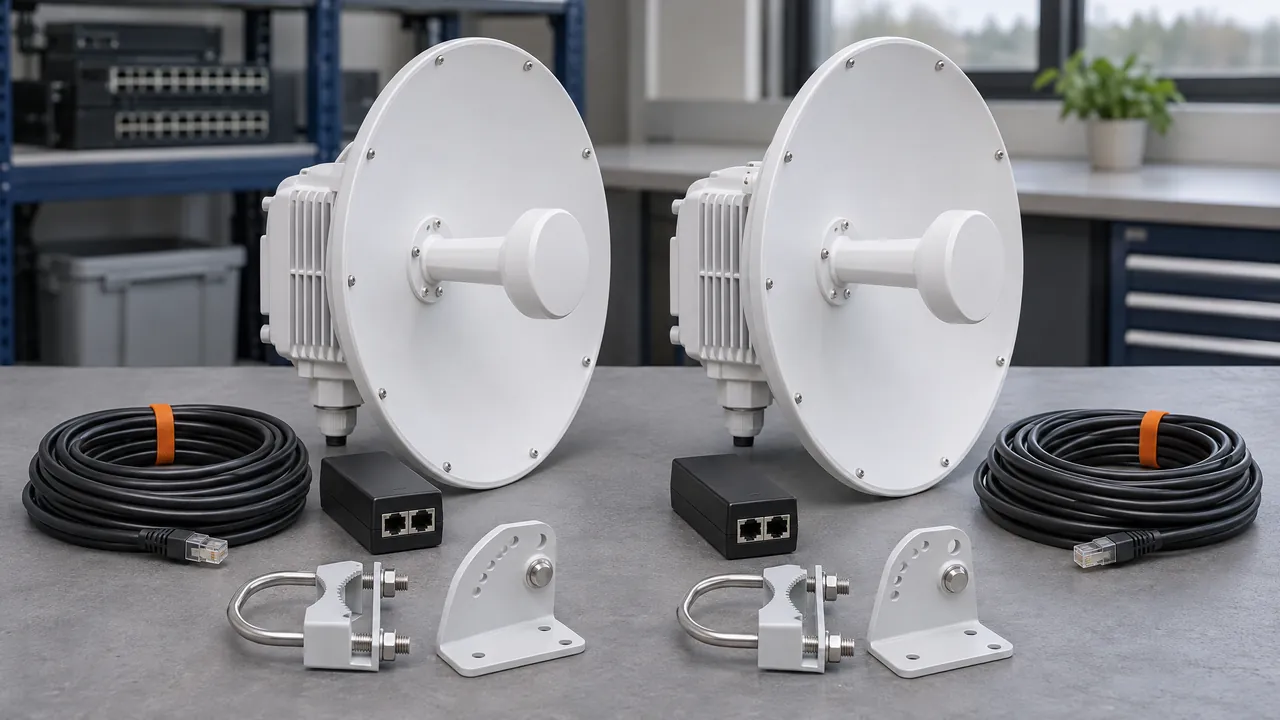
Directional dishes or patch antennas fit point-to-point campus links far better than sector panels, which exist to serve a crowd rather than punch a signal down one straight line. Shop for outdoor bridge radios with MIMO and PoE backing from vendors your IT department already trusts, since unfamiliar brands draw suspicious squints at review time. Spend genuine money on mounts, low-loss outdoor coax or properly shielded Ethernet, and never skip grounding or lightning protection, your gear and the building have both earned that courtesy. Configure everything to legal EIRP limits from day one.
Getting it physically mounted
Bolt everything down properly, no zip-tie-and-hope engineering. Aim with care, then recheck that aim the following day once the sun sits at a different angle. Route cables through proper conduit, seal every gland fitting, and leave a drip loop so rain can't crawl straight into your connectors. Ground the mast. Arrange roof access during facilities' working hours instead of creeping up at dusk, and let them handle the ladder or lift, that's their job and their liability too.
Securing the network side
Go with WPA3-Enterprise where your hardware allows. Sit the link on its own VLAN so campus-critical traffic never shares a lane with your experiment. Swap every default password the moment gear comes online, restrict management access to SSH or HTTPS alone, and stay current on firmware. Switch on logging and give IT visibility into it, since that transparency is what keeps you from "getting caught" in the ugly sense. Shape your bandwidth as well, nobody wants their link blamed for throttling the registrar's website during finals week.
Testing, adjusting, remembering it exists
Measure throughput, latency, and packet loss before declaring victory, then measure again after the final alignment. Tiny nudges to antenna angle often cure what a channel change can't. Then build a maintenance habit: periodic checks, firmware updates, and a re-alignment pass after any serious storm.
When things go wrong
Interference arrives uninvited now and then, so hop channels or tighten your directional isolation. Alignment drifts after wind or thermal expansion, so retighten mounts and recheck on a schedule. Cable or PoE failures tend to be dull affairs, test power right at the source and stash spare patch cords in a drawer somewhere.
If the wireless bridge isn't the answer
Sometimes the shrewdest play is handing the whole job to campus IT and letting them deploy enterprise-grade point-to-point hardware under their own management umbrella. A temporary fiber run or leased line serves mission-critical needs better anyway. And when the topology between your two buildings is genuinely hopeless, a commercial outdoor Wi-Fi provider or mobile backhaul service spares everyone the headache.
The "didn't get caught" checklist
Permission secured, equipment approved, safety handled, IT kept fully informed, configuration locked down, maintenance plan written down. That's the whole thing. Signed, sealed, and nobody's tiptoeing across a rooftop at midnight wearing a headlamp.
Build it smart, build it safe, and on the days the sneaky route tempts you, pack snacks and a permission form instead.