Type 01Omni
Omnidirectional whip
- Gain
- 2-5 dBi
- Ports
- 1
Listens in every direction at once. That's the right call for vehicles, boats, and any site ringed with towers.
Nine out of ten site visits I make start the same way: someone in a dip of a valley, a van losing calls on the motorway, a 5G router stubbornly refusing to reach the speed printed on its retail box. Before I touch a single piece of hardware, I want two answers. Which bands does the operator run? And what shape of antenna fits the path between you and the tower?
01Bands
An antenna listens only where it was designed to listen, so I dig into the operator's band plan before recommending anything. Below are the bands I bump into most often, along with the downlink range a receiving antenna must cover for each.
| Band | Common name | Downlink (MHz) | Mode | Where you meet it |
|---|---|---|---|---|
| B20 | 800 MHz | 791-821 | FDD | Europe |
| B8 | 900 MHz (GSM 900) | 925-960 | FDD | Europe, Asia, Africa |
| B3 | 1800 MHz (GSM 1800) | 1805-1880 | FDD | Europe, Asia, Africa |
| B1 | 2100 MHz | 2110-2170 | FDD | Europe, Asia, Africa |
| B7 | 2600 MHz | 2620-2690 | FDD | Europe, Asia, Latin America |
| B28 / n28 | 700 MHz APT | 758-803 | FDD | Europe, Asia-Pacific, Latin America |
| B12 | 700 MHz lower | 729-746 | FDD | North America |
| B2 | 1900 MHz PCS | 1930-1990 | FDD | Americas |
| B66 | AWS 1700/2100 | 2110-2200 | FDD | North America |
| n71 | 600 MHz | 617-652 | FDD | North America |
| n41 | 2500 MHz | 2496-2690 | TDD | North America, China |
| n78 | 3500 MHz C-band | 3300-3800 | TDD | Europe, Asia, Africa |
| n77 | 3700 MHz C-band | 3300-4200 | TDD | North America, Japan |
Band plans shift from country to country, and from one operator to the next inside the same country, so read this table as a starting point. Confirm against your modem's diagnostics page or the operator's own coverage maps before buying anything.
02Antenna Shapes
Gain is never free. Every decibel you aim in one direction gets taken from the rest, so a high-gain Yagi hears a single tower beautifully and everything beyond it barely at all. Match the shape to how many towers you actually need to hear.
Type 01Omni
Listens in every direction at once. That's the right call for vehicles, boats, and any site ringed with towers.
Type 02Directional
A flat patch array pushing a wide forward beam. Aim it roughly and it forgives you, and it sits neat on a wall.
Type 03Directional
The old directional workhorse: driven element, reflector behind it, directors lined up ahead, all squeezing the beam toward one tower.
Type 04Wideband
A log-periodic dipole array gives up a bit of gain in exchange for very wide bandwidth, letting one antenna stretch across 700 to 2700 MHz.
Type 05MIMO
Two antennas sharing one radome, slanted at 45 degrees, feeding two MIMO ports with signals that fade on their own schedules.
Type 06Combo
A squat dome hiding several elements, and plenty of them throw in GNSS and Wi-Fi ports for routers and kiosks.
03MIMO
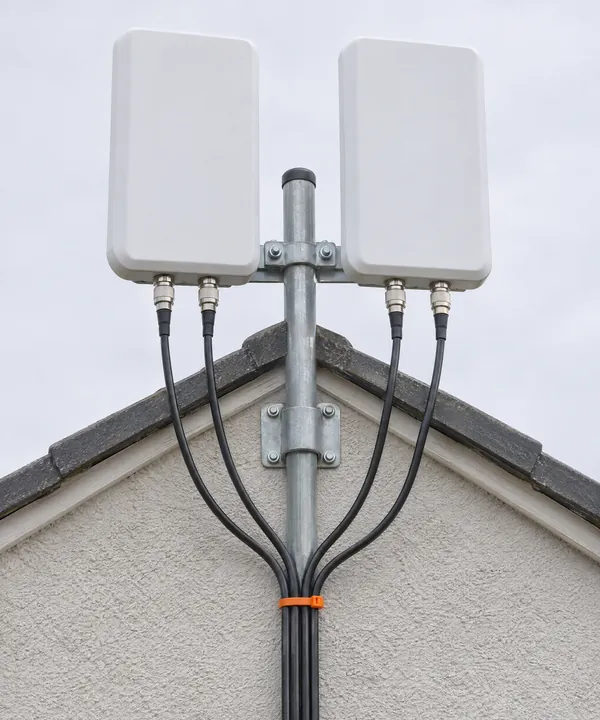
Modern LTE and 5G modems lean on MIMO: two antennas, sometimes four, catching independent streams simultaneously. Wire a 4x4 modem to one lonely Yagi and three of its receivers go hungry. The modem reports healthy signal numbers, and your throughput still disappoints.
MIMO wants antennas that see the tower differently, through polarization or sheer distance. A cross-polarized panel hands you two decorrelated ports inside one housing. Need four? Mount two panels a wavelength or more apart, or spring for a four-port model. And label both ends of every cable, because an afternoon spent tracing a GNSS lead plugged into a cellular port is an afternoon you never get back.
04Boosters
A booster strings three pieces together: a donor antenna outdoors facing the tower, an amplifier, and a server antenna rebroadcasting the signal inside. Fitted well, it saves a house with thick stone walls. Fitted badly, it squeals.
The one rule I refuse to break is isolation. Path loss between donor and server antennas must exceed the amplifier's gain by 15 dB minimum, or the booster starts amplifying its own output and becomes an oscillator that jams the local cell. Separate the antennas vertically, let the building sit between them, and check your local law first: many countries allow only certified boosters, and some ban them outright.
isolation ≥ G + 15 dB
05Accessories
Half the faults I get called out for live in the small stuff between antenna and modem. These are the parts I inspect before anything else.
The selection guide asks six questions, and the calculators turn your answers straight into decibels.