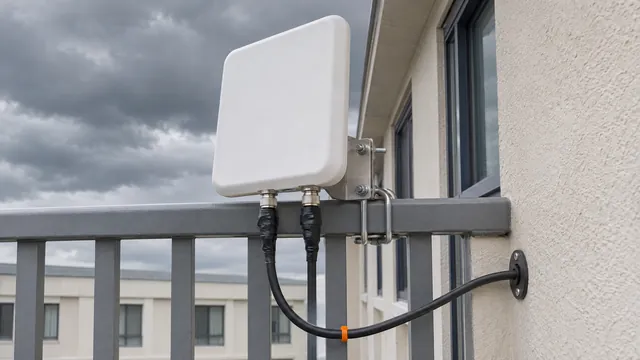
A thunderstorm, a family of rats squatting in the coax conduit, and a roommate who tripped over the feeder line en route to the fridge. Is this normal? Oh, completely. So here we are. Let's talk about antenna survival on a ramen budget, when weather, wildlife, and your own housemates have all apparently formed an alliance against you.
The Four Non-Negotiables
Boring first, fun later. There are four things you skip at your peril: a mount that's actually secure, connectors sealed against weather, grounding done right, and strain relief on every single cable run. Neglect one and your Saturday disappears into a mystery instead of a fix, which is the worse trade. A mount that wobbles vibrates in the wind until a connector snaps. A mast with no ground path becomes an expensive lightning rod. And when someone tells me "the Wi-Fi just stopped," I put money on a cable that pulled itself halfway out of its jack. Nail these four. The rest is fine detail.
Weatherproofing, Because Nature Has No Sympathy for Your Exam Schedule
Housing first. Get an enclosure with an IP65 or IP67 rating and treat that rating as real, because it's the line between a dry board and a soggy paperweight. UV-stable plastic matters just as much. Cheap housings turn brittle and crack after a single summer of sun. Mounting a directional Wi-Fi antenna or a mobile signal booster outdoors? Buy the enclosure rated for outdoor duty, not whatever was cheapest on the shelf.
Seal every connector like your signal depends on it, because it does. Weatherproof N-type or SMA connectors, rubber boots, heat-shrink tubing, a smear of dielectric grease: together they keep corrosion from devouring your signal. Water wicks into coax joints through capillary action, a real physics term, and once moisture is inside, your SWR readings drift sideways for no visible reason. Grease the threads. Shrink the joint. Get on with your day.
Ground the thing or regret it later. A ground block plus a basic surge protector, bonded properly to your building's grounding system, is cheap insurance against the single strike that cooks your router, your antenna, and possibly your laptop charger in one flash. Doing rooftop work? Bring a friend. My concern isn't your balance exactly, more that "fell off a roof alone" reads poorly in a med school essay.
Wind and ice earn respect too. Brackets should match your local wind load, and in a genuinely gusty spot, guy wires or a lower-profile antenna design will serve you better than a tall mast. Ice adds weight nobody did the math for, so inspect brackets before winter instead of after your antenna has already landed on the lawn two floors below.
And give water an exit route. A drip loop, which is just a downward bend before the cable enters a wall or enclosure, stops water from streaming straight into your gear. Small vent holes fitted with breathable membrane covers keep condensation from accumulating inside sealed housings, which would otherwise turn the enclosure into a mold greenhouse in miniature.
Rodents, and Other Roommates Nobody Invited
Rats and squirrels chew coax. Why copper and dielectric foam appeal to a rat's palate I cannot tell you, but they do, and a chewed-through cable is among the most maddening failures to diagnose because everything looks fine until you trace the line inch by inch. Armor your exposed runs. Conduit, stainless steel braid sleeving, heavy-duty split loom tubing, take your pick. All cheap, and all convert a tasty snack into a boring piece of plastic.
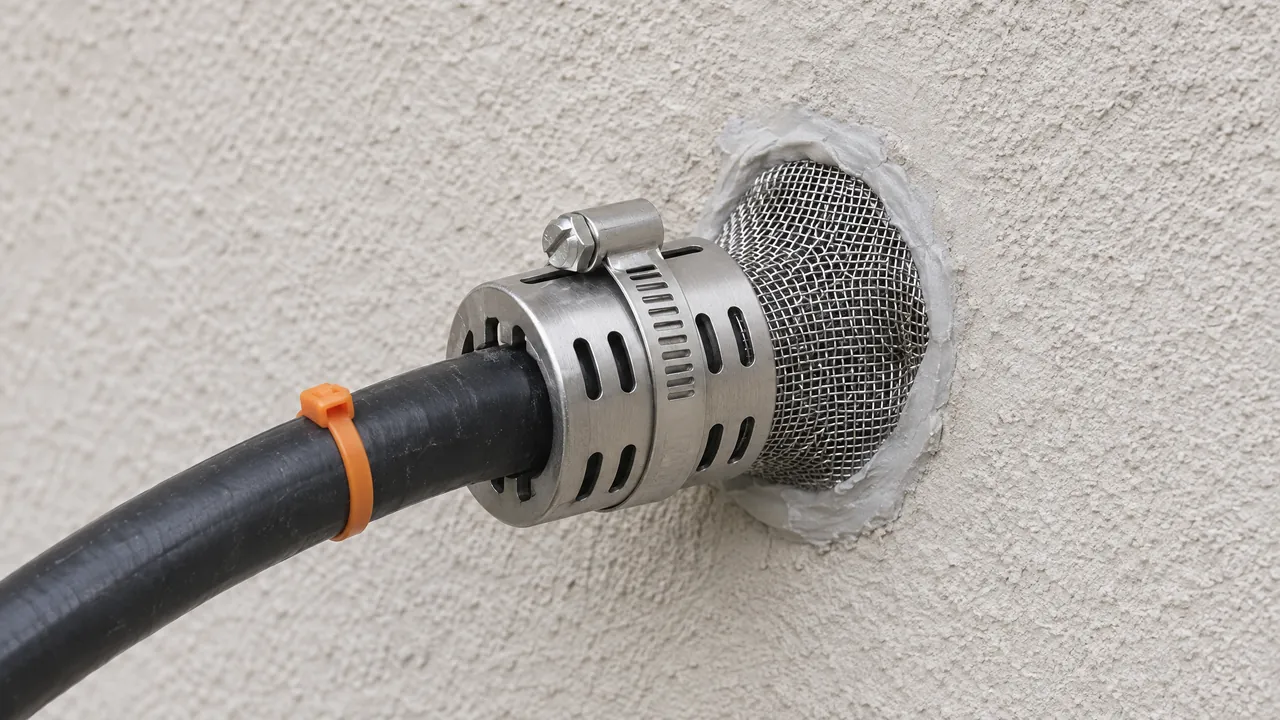
Seal the entry points as well. Fine stainless steel mesh around cable penetrations, plus rodent collars where coax passes through a wall or roof, close off the gaps. A rat can flatten itself through a hole the size of a quarter, a fact I know and would happily un-know.
Ultrasonic rodent gadgets? Pass. The research on them is shaky at best, and every engineer I know treats them as a placebo with a nightlight attached. Physical exclusion beats attempts at annoying rats into moving out.
Tidiness counts. Nesting material, food scraps, loose garbage near your mount, that's a welcome mat. Check now and then for droppings near cable entry points. Gross, yes. Still better than finding a nest wrapped around your mast bracket.
The Housemate Who Trips Over Everything
Run cables along walls or ceiling edges, never across a walkway, and put your antenna mount somewhere it won't moonlight as a coat rack. If flat coax under a carpet is genuinely your only option, lay a cable protector strip over it first, since foot traffic grinds connectors down over time even without an actual tumble.
Cable clips, raceways, zip ties at regular intervals: these make sure the cable's weight never hangs off the connector itself. A connector should never carry tension. Strain relief anchors exist for exactly that job.
A length of PVC pipe split lengthwise, or a small decorative cage, hides the mast base and shields it from a stray knee or a vacuum cleaner attack. No fortress required. Just something solid between the hardware and the next clumsy incident.
Tape a handwritten sign near the setup. "Please don't unplug this unless you've also agreed to pay my data overage" performs better than you'd guess. Cheap diplomacy, house agreements.
And teach your housemates the three fixes that resolve 80% of problems: hand-tighten a loose connector back into place, snap a cable clip home, and zip-tie a wobbly mast as a stopgap until you can do it properly. No radio engineering degree needed. A steady hand and five minutes.
Hardware That Survives a Beating
For exposed mobile signal installs, choose ruggedized directional 4G or 5G antennas rated for outdoor use over a desktop unit zip-tied to a windowsill. Outdoor Wi-Fi kits built for long-range links already expect rain and temperature swings. Specialized GPS or IoT antennas meant for vehicle mounting tend to be overbuilt for durability, which makes them a smart, if slightly excessive, pick for a hostile dorm balcony.
On cable: LMR-400 outperforms RG-6 and RG-58 on longer outdoor runs because signal loss stays lower over distance. It costs more and fights you on bends, though. Short indoor hops? RG-6 is fine and much kinder to a student wallet.
Window mounts, balcony clamp mounts, and portable telescoping masts give you height and exposure without drilling anything your landlord will invoice you for later.
A Maintenance Habit Worth Ten Minutes a Month
Glance at the setup monthly. Quarterly, test connectors and grounding with a basic multimeter. Before storm season or winter, check brackets and ice load tolerance. Keep a small kit close: multimeter, weatherproof tape, zip ties, a few spare connectors, a mast wrench. Shoebox-sized, the whole thing.
When Signal Vanishes for No Reason
Line of sight to the tower or router comes first. Then connectors, looking for looseness. Then exposed cable, looking for chew marks. Then grounding continuity. Last, isolate the fault by swapping components one at a time until you learn if the antenna or the modem is the problem. That order usually finds the culprit inside ten minutes.
When to Phone Somebody Competent
Lightning damage, major roof access, complicated grounding, anything needing a permit: these are cases where paying a professional costs less than the ER visit or landlord dispute that follows a DIY mishap. No shame in it. Half my job exists because people attempted the rooftop fix solo first.
The Cheat Sheet
Mount it as if a hurricane is coming. Weatherproof every connector, no exceptions. Ground the system, every time. Armor cables against rodents before the rodents arrive. Guard the base from clumsy feet and curious hands. Inspect seasonally, not just when something breaks. Call a professional for anything involving electricity or heights you're shaky on. And keep your sense of humor handy, since something will eventually go wrong, and it makes a far better story than a working antenna ever did.
Go mount responsibly, and may your Zoom calls hold steady at the worst possible moment.