Wi-Fi Antennas
Nobody pats their Wi-Fi antenna on the back. When the signal drops, the router gets the blame, a bigger router gets bought, and those two unassuming plastic sticks keep doing the actual steering of the signal in silence. This page is my attempt to right that wrong: I'll walk through the bands, the antenna shapes you'll meet in the wild, and the outdoor setups where picking the right antenna earns its keep.
01Bands
Three Bands, Three Temperaments
2.4 GHz punches the furthest and shrugs at walls, in exchange for a cramped and congested slice of air. 5 GHz gives up some distance and hands you a far bigger pile of channels in return. Then there's 6 GHz, which Wi-Fi 6E and Wi-Fi 7 unlocked: wonderfully wide, wonderfully clean channels that give up the ghost the moment brick or concrete gets involved.
| Band | Range (MHz) | Channel widths | Wi-Fi generations |
|---|---|---|---|
| 2.4 GHz | 2400-2483.5 | 20 and 40 MHz | Wi-Fi 4, 6 and 7 |
| 5 GHz | 5150-5850, varies by country | 20 to 160 MHz | Wi-Fi 4, 5, 6 and 7 |
| 6 GHz | 5925-7125 (US), 5945-6425 (EU) | 20 to 320 MHz | Wi-Fi 6E and 7 |
| 60 GHz | 57000-71000 | 2160 MHz | 802.11ad and 802.11ay |
Pattern A360°
Omnidirectional: Signal in Every Direction
An omni sprays its energy out in a doughnut shape around its axis, which is exactly why it happily talks to clients on all sides. Crank up the gain, though, and that doughnut squashes flat: you gain reach toward the horizon and lose whatever was directly underneath. Put a 12 dBi collinear on a tall mast and, amusingly, the folks standing right at its base are stuck with the worst reception on the whole property.
Pattern BBeam
Directional: Point and Shoot
Panels, sectors, Yagis, grids, dishes: every one of them squeezes energy into a beam. The beam earns you range and tells interference coming from the sides to get lost, a genuinely valuable trait on a packed 2.4 GHz band. The catch is that you have to aim the thing. A 24 dBi grid throws a beam roughly 10 degrees wide, so a lazily torqued bracket will have drifted off target by the time the first storm rolls through.
| Type | Typical gain | Beamwidth | Good for |
|---|---|---|---|
| Dipole | 2-5 dBi | 360° | Indoor access points |
| Collinear omni | 6-12 dBi | 360° | Campsites and courtyards |
| Patch panel | 8-14 dBi | 30-70° | Wall-mounted coverage |
| Sector | 14-19 dBi | 60-120° | Point-to-multipoint hubs |
| Yagi | 12-16 dBi | 25-40° | Short point-to-point hops |
| Grid parabolic | 24-30 dBi | 5-10° | Long links in windy spots |
| Solid dish | 23-34 dBi | 3-8° | Long 5 GHz backhaul |
02Long-Range Links
Long-Range Links, With the Math Shown
Point-to-point links are where I get to have fun with arithmetic. Picture two 23 dBi dishes staring at each other across 10 km at 5.8 GHz. Free-space path loss lands around 127.7 dB. Fire the transmitter at 20 dBm, knock off 1 dB of cable loss per end, and the receiving side sees roughly -63.7 dBm: comfortable headroom above a radio that starts struggling to decode its basic rates near -90 dBm.
That headroom, the fade margin, is what carries a link through rain, fog, and the occasional pigeon perched on the dish. My personal floor is 15 dB for anything under 10 km, more beyond that, and I run the Fresnel zone numbers before believing a word of it. One caution: verify your country's EIRP ceiling before you clone this setup, since a number of regulators cap 5.8 GHz at levels this dish pair comfortably exceeds.
- Distance
- 10 km
- Frequency
- 5.8 GHz
- Tx power
- 20 dBm
- Dishes
- 2 × 23 dBi
- Cable loss
- 2 × 1 dB
- Path loss
- 127.7 dB
- Received level
- -63.7 dBm
Rx = 20 + 23 + 23 - 1 - 1 - 127.7 = -63.7 dBm
03Outdoor Installs
Outdoor Installs Built to Outlast the Weather
In my experience, outdoor Wi-Fi dies at the connectors and joints well before anything goes wrong at the radio. Here's the checklist I run through before I drive away from a site.
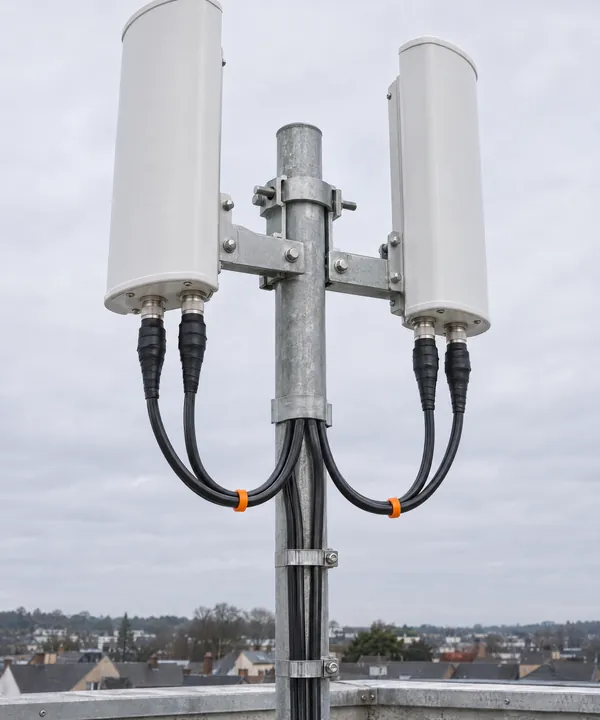
- Wrap every outdoor connector in two layers of tape, self-fusing stuff on the inside.
- Form a drip loop beneath each connector so rain drips off the cable before it crawls into the joint.
- Tie the mast and cable shield to ground, and bolt a surge arrestor where the cable crosses into the building.
- Torque the brackets for the nastiest wind of the year, then revisit after the first gale and re-check the aim.
- Buy outdoor-rated, UV-stable cable, and keep the run no longer than the mast forces it to be.
04Polarization
Polarization and MIMO in Wi-Fi
Nearly every outdoor Wi-Fi radio sold today runs 2x2 MIMO through a dual-polarized antenna: one chain vertical, one horizontal, or the pair slanted at 45 degrees. Match the far end. Rotate a dish's feed by 90 degrees and the link stays up, just living on swapped chains.
A few stray degrees of twist cost you almost nothing. Miss by a full 90 on a single-polarized link and you've thrown away 20 dB or more, a mistake I've watched students burn an entire afternoon on while blaming a perfectly innocent radio.
Run the Link Numbers Before You Climb the Mast
Feed your figures into the link budget and Fresnel calculators first. Fixing a spreadsheet beats fixing a mast, every single time.